
Loading

Our Solution for Costume and Props Shops that offers your client to walk-in, browse, and shop your inventory
General
Rental Tracker Pro (RTPro) offers a solution to organize, simplify, and gain control over your inventory and operations. The software is ideal for the Costume and Property shops.
Although all our clients have a majority of the same processes, RTPro is flexible and allows tailoring the software for your specific needs. The software is easy to use and hassle free. RTPro offers many features which can be turned on or off and modified depending on your business needs. Examples would be the Calculation of Cleaning Cost, Restocking, and Rental Billing Schedule.
RTProCP’s All Inclusive Modules

Administration - Controls system setup settings, features to use, user login security, and customer website.

File Maintenance - Maintain tables such as category, production type, tax, colors , patterns , material, gender/department, the condition of item, collections, and customer fields.

Inventory - This module manages both rental and sales inventory, including barcoded/RFID and non-barcoded items. It also includes features for tracking repairs and managing retired inventory.

Order Processing - This module manages the full order lifecycle—from creation and linking to Parent Company, Production, and Contacts, to handling check-outs and check-ins for both barcoded and non-barcoded items. Return statuses (Clean, Not Clean, Damaged, Lost, or Traded) are tracked, and items can be transferred between orders. Check-ins can be done by Parent Company, Production, individual Order, or across all open Orders. It also generates key client-facing reports, including Checkout Contracts, Check-in Sheets, and Loss & Damage Reports.

Billing - Invoices can be generated for individual orders or grouped across multiple orders. Charges include rentals, extended rentals, restocking, loss and damage, sales, and unlimited misc. fees. Features include flexible billing schedules, batch invoice creation, and detailed billing reports—such as unbilled orders, extended rentals, L&D charges, and invoices tied to purchase orders.

Reports - This module offers a wide range of statistical, operational, and management reports, including Inventory, Current Rentals, Sales Activity, Utilization, Consignment Revenue, Production Activity, and Repair/Retired items. Reports can also be scheduled for automated email delivery.
Shopping Cart - This feature lets users build rental quotes by adding both barcoded and non-barcoded items. Quotes can include images and be printed or saved to a media device. Additionally, shopping carts can be easily converted into orders to streamline the rental process.
Included Advanced Features

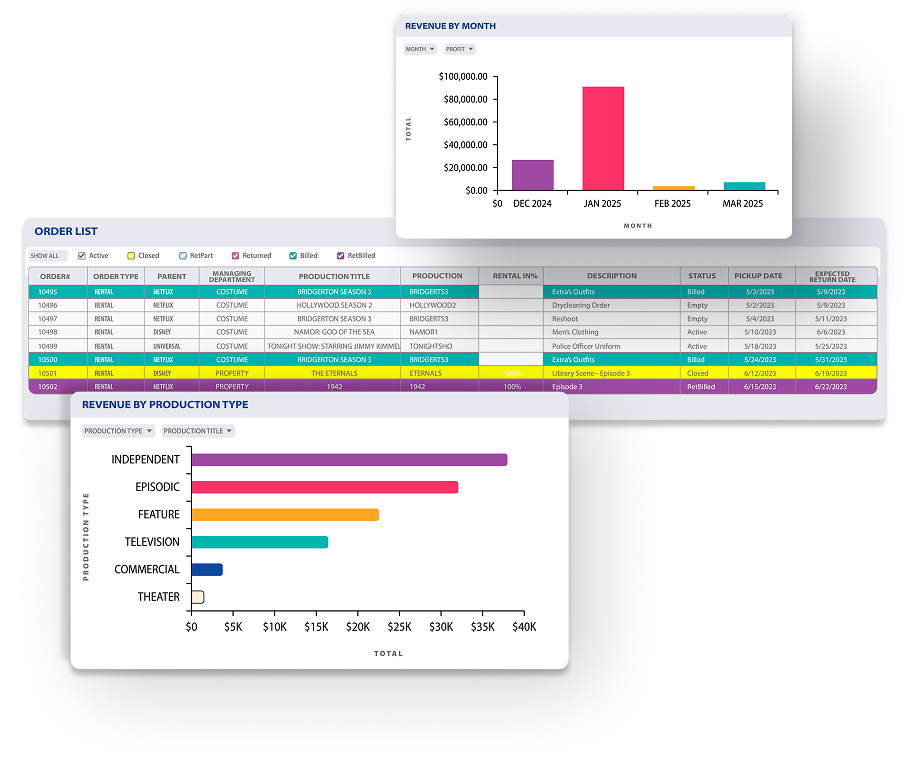
Dashboard Widgets - A free web-based application that integrates with core RTProCP to view and analyze data from a variety of widgets. Users can monitor information with customizable filters and graphs anywhere in the world.

Business Intelligence - Reports within RTProCP can be displayed as graphs and charts to help with analyzing and presentation.

System Messaging - RTProCP’s Message Board allows users to start a chat room within RTPro. Chats can be linked to orders, invoices, and POs and stored for later viewing. Message boards can be set up for automated System messages that can alert users of activates such as modified orders, Checkout and check-in processes, and much more.

Online e-Signature - Email a signature request to be e-signed and saved as a PDF automatically.

Help Manual - Online help manual with clear instructions and tutorials. Users can jump directly to the chapter or page for which the user is working on.
Free iOS Applications

RTPro Image App - Users can take new or view existing images directly from the free mobile app. Pictures taken will be uploaded directly to RTProCP as a direct link without the need to download and upload the image.

RTPro e-Signature App - Provide clients doing a will call or pickup to sign contracts and checkin sheets directly from a iOS device as a signature pad. Signed documents will uploaded and attach to RTProCP immediately.